Xbox Cloud Gaming Scores & Finder
Find the good games on Xbox Cloud Gaming, fast.
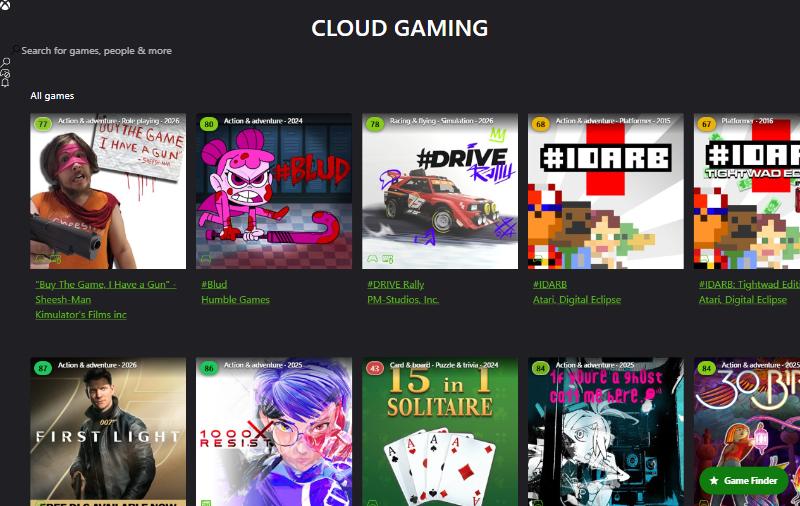
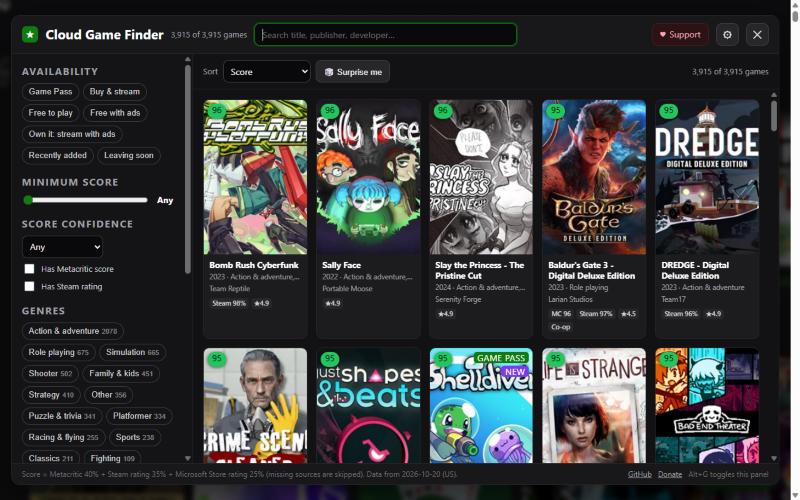
Xbox Cloud Gaming has thousands of streamable games but almost nothing to judge them by. This free Tampermonkey script puts a rating score and genre on every game tile and adds a Game Finder that filters and sorts the whole cloud catalog, about 3,900 games.
What it looks like
Features
Score badges on every tile, colored from red to green. Hover one for the Metacritic, Steam, and Microsoft Store breakdown.
Genre and release year on each tile, and a score card on game pages with links to Steam and Metacritic.
Game Finder: filter by score, genre, Game Pass, free to play, touch controls, mouse and keyboard, co-op, multiplayer, and release year. Sort by score, popularity, newest, and more.
Surprise me opens a random game from your current results.
Optionally dims low scorers on the normal Xbox pages, and hides itself while you're streaming a game.
Install
- Install Tampermonkey for your browser.
- Open the install link. Tampermonkey shows an install page; click Install.
- Go to xbox.com/play. Tiles get score badges, and the Game Finder button appears at the bottom right.
On recent Chrome and Edge, turn on Developer mode (or "Allow user scripts") for Tampermonkey on the extensions page first. Tampermonkey checks for updates automatically, and each data refresh brings new scores.
How the score works
Each game gets one score from 0 to 100: a weighted average of the Metacritic critic score (40%), the Steam rating (35%), and the Microsoft Store user rating (25%). Missing sources are skipped, and games with only a few ratings are pulled toward the middle so a handful of 5-star votes can't top the chart.
Badges with only a few user ratings get a white ring, meaning "take with a grain of salt". Only aggregate numbers are used; no individual reviews are fetched or shown.
Privacy
No analytics, no tracking, and no server of ours. The scores are bundled into the script, and your settings stay in Tampermonkey's own storage. The only requests it makes are optional lookups for games newer than the bundled data, sent to Microsoft's public catalog. You can turn those off.
Not affiliated with, endorsed by, or sponsored by Microsoft, Xbox, Valve, Steam, or Metacritic. Scores are a guide; your taste may differ. Bug reports and ideas are welcome on GitHub Issues.